Tuesday, November 30, 2010

Some Odd Girl Hol-ODD-day Blog Hop


Welcome to the first Some Odd Girl Hol-ODD-day Blog hop. Kristy and the Odd Girls are having this hop this holiday season not only to show their love for all of their Oddies, but also to include us. So hop through the list and be sure to comment at every stop because the Odd Girls have some prizes to give away but you have to complete the list to be entered. If you've come from Jennifer's Blog you're on the right track, but if not, you'll want to start at the Some Odd Girl Blog so you don't miss a thing.

Although I'm sure you'll see many fabulous holiday projects today, I decided to make a thank you card instead. I've used Tobie and Buddie and Tiny Princess Tia on the front. They're both colored with Copics and fussy cut and popped on some fabby paper from Creative Imaginations that I've printed with the sentiment. The background was so perfect that all I used for embellies were a few Prima flowers. The sweet innocence of these images reminds me of a children's book so I've showcased them accordingly.


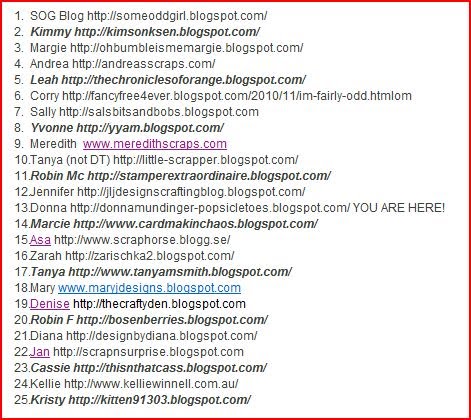
Inside is Kiss a Prince Tia. I think the 3 of these adorable images tell a little love story and would make a sweet thank you for that special someone who has given you the perfect gift, don't you? BTW, all Tia images are on sale through Dec 3rd so be sure and check them all out HERE. Now hop along to Marcie's Blog but don't forget to comment to be eligible for the prizes. And in case you get lost, here's the complete list.


5) Leah


10) Tanya (not DT)


13) Donna YOU ARE HERE

14) Marcie

15) Asa

16) Zara

17) Tanya

18) Mary

19) Denise


21) Diana

22) Jan

23) Cassie

24) Kellie

25) Kristy


And for all you Scrapper's out there, my dear friend and DT sister Susan is having a 2 day sale on her fab DVD It's a Kid's Life so check it out HERE!

Monday, November 29, 2010

BBTB2 Deck the Halls Challenge


We're decking the halls at BBTB2 with a fun challenge from our wonderfully talented and dear DT sister Jeri. The challenge is to use that phrase WITH the ornaments from the Winter Frolic cartridge. The inspiration for my card came from the sort of retro style of the Deck the Halls cut. When searching for paper I came across this nostalgic print from Melissa Francis and the stripes from the same line so I chose the (rather dull) colors accordingly. I embossed the first mat with the Cuttlebug Polka Dots embossing folder and inked everything to age it all up further and I colored the stars with a silver leafing pen.
The whole thing made me think of the old ornament boxes I have from my childhood and when I dug one up, I realized that Melissa Frances must have used the box for inspiration as well.

My card has a shaped front (obviously one of my fave types to make) using Design Studio and the rounded rectangle from George for the back.
Then lots of popped layers and adhesive beads. Yup, another fat one. Not exactly merry and bright but it took me back. There's tons of inspiration to get you in the Christmas spirit at BBTB2 so go have a look, and if you don't have Winter Frolic, you can choose the words and ornaments from any cart.

Sunday, November 28, 2010

Macabre Monday Paper Pandimonium


It's another Macabre Monday and we have a very special challenge this week featuring the the fabulous digi papers from Crafty Chaos Designs by our very own Digital Demoness Susan. Susan's papers are To DIE FOR and I had a hard time choosing but the new Simply Steampunk was so awesome I just couldn't resist! The challenge for you is to create something with minimum of 2 patterned papers. (piece of cake, no?) and you may win one of these fab sets for your very own. The hard part for me was finding a suitably creep image (after all, we are all about creepy, aren't we?) to live up to the fab papers. I surfed the net until I found this artwork entitled Steamnocchio by Fabricio Moraes. I fussed a bit in photo editing a bit to change the coloring to match the gorgeous papers and cut the face out with my Nesties. Then I added a Sprocket Gear and Game Spinner from Tim Holtz to his eyes to add to the creep factor.
I cut a window in the paper and backed it with another of Susan's fabulous designs from the set and popped the face on top. I crimped an additional piece threaded it through a buckle (from J's) that I heat embossed with Pirate Gold embossing powder and added it to the corner. The Memo Pin and Philosophy Tag are also Tim Holtz. The sentiment is computer generated. I LOVED working with these papers! Now run to HDH to view the fab creations by my Sinister Sisters and be sure to play along for a chance to win a set of your choosing from Crafty Chaos Designs of your very own. And BTW, Susan has a fab sale going on right now so you just might want to check it out HERE. OOps! Jumped the gun a bit. You can tell I'm tired. Check back in a few hours if the Macabre Monday isn't up yet. Sorry!

Friday, November 26, 2010

Bah!Humbug! Lovely in Lilac Challenge


Happy Black Friday to all of you bargain shoppers. For me, not so much. The thought of getting up in the early hours, standing in lines, and battling traffic and crowds is not my idea of a fun day. Shopping should be a pleasurable event, not frenzied free for all. I intend to stay home and digest yesterday's overindulgences, do some crafting and just maybe shop online.

I know it's late, but I couldn't stand the thought of missing a Bah!Humbug! Challenge so this is for last week's Lovely in Lilac. I actually thought it was the last challenge of the year so I was particularly determined, but I see we've one more for next week, Feeling the Blues, due December 2nd. I'll definitely be back with that. I've so loved playing along with Ann, Max and Irene these many weeks and can't wait 'til the begin again in January. Who doesn't love the opportunity to do Christmas all year long and not look like a lunatic? LOL Now, if I can just get some of these cards in the mail, I'll be all set!

I wanted to use my new Trim the Tree Cricut cartridge and chose the second skinnier one because I knew I wanted to put it in some kind of frame. The cuts are quite delicate so I cut it at 5" and used the multicut twice to make sure it was clean. What was weird though, the blackout of this tree is not symmetric and cuts out a portion of the left side which really bugged me. In Design Studio I thought I could just hide the contours to fill it in, but for some reason, on that side the snowflakes aren't touching, so the outline is continuous and there is no extra contour to hide. Had I not been in a hurry, I'm sure I could have filled it in with shapes or something, but I had limited time (and paper) so I just trimmed a small piece by hand to cover that area from the back and glued it on. Looks like that's the only one like that from the chart, though. Wouldn't you know I'd pick that one and not notice?

The frame is the Cuttlebug Emboss Plus Lace Door and (Margie and) I made an observation about that too. First of all, the cut looks more clean if you turn it over so it's debossed rather than embossed (here I filled in the debossed lines with silver peel off borders) and also, you should dig out the pieces stuck in the the cut areas before using it again, or it might not cut through. Definitely a PITA, but better than having to do it all over again.

I double popped the tree so it would stand out better from the lacy frame and added some adhesive gems and a peelie sentiment. This certainly is purple, isn't it? I originally thought the lilac would look lovely with white behind it, but the detail was lost and it looked all washed out so purple it is! Yikes, pretty darn busy, too. My favorite purple loving fan likes me to keep things simple. Sorry hon. xx

Thursday, November 25, 2010

Happy Thanksgiving and a Recipe


Happy Thanksgiving to all who celebrate it and a wonderful weekend for the rest of you. I'm doin' the "Happy Dance" because all of my cooking responsibilities are done and it's not even breakfast time! WooHoo!

Thought I'd share the recipe for Butternut Squash Lasagna that has become a Thanksgiving tradition for us.

3 lbs. butternut squash, quartered, seeded, peeled and cut into 1/2" cubes (about 9 1/2 cups)
Trust me, if you can find it already cut up at Costco like I do, this goes a whole lot quicker!

3 T vegetable oil

4 cups whole milk

2 T dried rosemary, crumbled

1 T minced garlic

1/2 stick (1/4 cup) unsalted butter

1/4 C all-purpose flour

Nine 7 x 3 1/2" sheets of no boil lasagna noodles (I use Barilla because they're nice and flat)

1 1/2 cups freshly grated Parmesan (about 5 oz)

1 cup heavy whipping cream

1/2 tsp salt

Preheat oven to 450 and oil 2 large shallow baking pans.

In a large bowl toss squash with oil until well coated and spread in one layer among the pans. Roast squash 10 minutes, then season with salt. Stir squash and roast 10 minutes more, or until tender and beginning to turn golden.

While squash is roasting, in a saucepan bring milk with rosemary to a simmer. Cook milk mixture over low heat 10 minutes and pour through a sieve into a large heatproof 1-qt. pitcher or measuring cup.

In a large heavy saucepan cook garlic in butter over moderately low heat, stirring until softened. Stir in flour and cook the roux, stirring, 3 minutes. Remove pan from heat and add milk in a stream, whisking until smooth. Simmer sauce, whisking occasionally, 10 minutes, or until thickened. Stir in squash and salt and pepper (white if you have it to avoid the black specks if that bothers you) to taste. (I smoosh a bit of the squash into the sauce but leave plenty of chunkiness too.) Sauce may be made 3 days ahead and chilled, it's surface covered with plastic wrap.

Reduce heat to 375 (or preheat if you've made sauce ahead) and butter a 13x9x2 " baking dish.

Pour 1 cup of sauce (it will not cover the bottom completely) and cover with 3 lasagna sheets, making sure they don't touch. Spread half the remaining sauce over the pasta and sprinkle with 1/2 cup Parmesan. Make one more layer in same manner with 3 sheets, remaining sauce and 1/2 cup Parmesan and top with remaining 3 lasagna sheets.

In a bowl with an electric mixer beat cream with salt until it holds soft peaks and spread evenly over lasagna, making sure pasta is completely covered. Sprinkle remaining 1/2 cup (or more like I do) over cream. Cover dish tightly with foil, tenting slightly to prevent foil from touching cream and bake in middle of oven 30 minutes. Remove foil and bake lasagna 10 minutes more, or until bubbling and golden. Let stand at least 5 minutes before cutting.

Since I've been doing this for awhile, I thought I'd give you my observations and tricks. First of all, no matter how you do it, it takes longer than it says to bake. I've always found that the top layer of lasagna sheets tend to curl up and you get some hard ends sticking up. To avoid this, you can either snap off the corners of the outer noodles before smoothing on the whipped cream, or do like I do and assemble it in advance (minus the whipped cream layer) and cover and refrigerate it overnight. Remove it from the fridge well in advance of baking (or again it will add that much more to the baking time), and let it come to room temperature, then apply the whipped cream layer and bake as directed. I've found the over night thing helps the noodles soften a little before baking and anything I can do in advance, I'm all over it! If the top layer curls, you can either turn them over, or push them down a bit before adding the top layer of cream. (I still bake it longer to get a nice brown crust on top. YUM!)

This is great for a dinner party because of the whole make ahead thing. The recipe says it serves 6 as a main course but it's pretty darn rich. I usually serve it as a side dish. Particularly yumbo with pork, or in the case of Thanksgiving, roast turkey.

Again I have to say thank you to all of my cyber friends for the love and support you give me on a daily basis. I am truly thankful to share this day with you and wish you a wonderful holiday.

Now what do I do? Craft maybe? Who knows, I may just be back with a project. We'll see. xxD

Wednesday, November 24, 2010

Kickin' Off Christmas Blog Hop Day 2


WooHoo! It's Day 2 of the Kickin' Off Christmas Blog Hop. Hope you are enjoying all of the fabulous projects using products from Chomas Creations mini gel pen and marker holders and the fab embossing tip, iCopic and SP&Company Stamp line and be sure to comment on each and every post to increase your chances of winning the prizes along the way. If you've arrived from Amber's Blog you're on the right track. If not, you might was to start at the beginning to hear about the special giveaway on Amy's Blog and the fabulous Black Friday prices on all of her wonderful merchandise. Hurry though, the prices are only good through 11:59 pm EST tonight!

For my project today I've created custom gift wrap using the mini gel pen holder and Cricut Design Studio. I have to admit, I really had no idea the time it would actually take to fill a 12x12 page using the words Merry Christmas (from Plantin Schoolbook roly poly font) but once I got started, I was determined to finish.

I typed each word separately because in the end, I wanted Merry in one color and Christmas in another. That required 3 full pages in Design Studio and tons of cutting and pasting. This first shot from Design Studio is the entire 12x12 mat filled with Merry Christmas.


Then, in order to have Merry in Red, and Christmas in green, I had to cut and paste all of the Merrys onto one page and the Christmas' to another. I did hide the contours of the letters that were off the margins when I finally began drawing to make sure the glue on the mat didn't gum up my pens. First I loaded the mini gel pen with the red and clicked "cut" to draw the Merry page. Then removed the holder and changed the pen to green (very carefully so as not to drop it on my paper) and drew again on the Christmas page. I really thought the paper came out cool, but did not anticipate how long it would actually take to do the full page. Let's just say you might plan to eat breakfast, exercise, shower, do your hair, etc. instead of just waiting around for the Cricut because I forgot that Design Studio has a mind of it's own when it comes to speed. It takes it's own sweet time. Not necessarily practical, but if the wrap were customized with a person's name? Pretty darn cool.

For the tag I used the Embossing tip and 10 Seconds Studio metal. I taped the red side down on the embossing mat and embossed the jingle bell from the Christmas Solutions cartridge. Then I sanded the embossing to show the silver underneath and cut the bell out with my scissors. I used the blackout version of the same cut (because the shadow cut out the bottom of the bell) and sized it larger for the back of the tag.
Then I used the Mini gel pens and holder to write the To: and From: on the back. (Again 3 mats in Design Studio or your gypsy). One for cutting, and one for each word because I wanted one red and one green.) The embossed metal easily attaches to card stock with Scor-tape. Please scroll down to Day one if you're interested in a link to a tutorial about using the gel pens (Mine is actually with Cricut markers, but they work the same way) And also the entire list of hoppers in case you get lost. Rough day today, and I'm honestly too tired to type it all in and link it again, but if you're following the hop, your next stop is iCopic. Thanks so much for visiting and for your sweet comments. Happy Thanksgiving to you ALL! xxD

Tuesday, November 23, 2010

Tiddly Inks Christmas Card Challenge


This is my second post of the day, so if you're looking for the
Kickin' Off Christmas Blog Hop, please scroll down.


This week at Tiddy Inks we've got the Christmas spirit so we're kicking off the season with a Christmas card challenge. I can't believe how the time flies. My card is a diamond fold and you can find a video HERE. There are so many fabulous Winter/Holiday stamps at the Tiddly Inks Store that I had a hard time choosing. I finally decided on the adorable Bah-Huggabugs. I printed them off 3 times so I could pop one of the bugs and paper piece the tree. they are colored with Copics, fussy cut and mounted on a Labels One Nestie. On each side there are presents from the Present Time set. I printed the digital stamp line art version of the stack so I could color them to match. I just cut the stack apart and popped the bottom present to go on either side. The sentiment, little chipboard peppermints and litte round poinsettia next to the tree are K&Co stickers.

I love how this card fold stands up and makes a little scene.

And the whole shebang folds up (pretty) flat for mailing too. With all of the dimension and those little Humbuggers it still fits in a 5 1/2 x 5 1/2 envie. Wanna see some more fabulous Christmas inspiration? The rest of the Tiddly Inkers have loads, so drop by the Tiddly Inks Challenge Blog and don't forget to play along You will have 2 weeks for this challenge so you can enjoy the Thanksgiving holiday with your friends and family.

Kicking Off Christmas Blog Hop


Welcome to Day 1 of the kicking off Christmas Blog Hop! If you've come from Amber's Blog, you're on the right track. If not, bop back to Amy's Blog because you're not going to want to miss the fabulous creations and wonderful prizes you can win so be sure to comment on each and every post to increase your chances and hop to the end because Samantha has a giveaway too. We're featuring products from Chomas Creations, iCopic, and the SP& Company Stamp line so I hope you're inspired.

My favorite way to use Amy's mini gel pen holder is to outline a Cricut cut and then color it with Copic markers and that's just what I've done here. I've used Tink from Tinker Bell and Friends and the poinsettias from the Christmas Solutions cartridge. I have to say I never use the Tinker Bell cartridge until Amy clued me about using the Gel pens with Copics. The cuts were far too intimidating. On one page in DS were the regular cuts for outlining, and on a second page were the shadows (with the exception of the poinsettia layers which didn't have shadows so I cut them with the regular cut) for the cutting. If you have questions how to do this, I have a tutorial HERE that explains the method (although the tut is for the Cricut markers, the method is the same).
The "Believe" sentiment (also from the Tink cart) was done with the embossing tip on vellum. I love the effect and it would have been impossible to make this cut on the Cricut so small. The window was cut with my Nesties Mega Ovals Large and outlined with peel-off stickers.
Then it was just a matter of popping the layers with dimensionals, glittering her wings with Stickles, and adding some adhesive beads and pom poms to her slippers and you have a magical Disney Christmas card. I so love the special effects you can do with the Chomas Creations holders and tip. The possibilities are endless! Next stop is the iCopic Blog and if you get lost, here's a list of the hop destinations. Be sure to come back tomorrow for more ideas. Enjoy!
Donna Mundinger You are HERE!


Monday, November 22, 2010

BBTB2 Hello Kitty Santa Challenge


This week our fabulously talented fearless leader Heather chose the challenge for BBTB2; the Santa Kitty from Hellow Kitty Greetings. Well you know I love me some kitties, but I HAD done this cut quite recently for Goliath to give to Daddy so I had to come up with a new twist. I used the card cut again but welded "Ho Ho Ho"(from Hellow Kitty Font) to the top of the hat in Design Studio, then added a Santa beard from Paper Doll Dress Up. Kitty is flocked, as is his suit and there's lots of glittery goodnesss on the letters, his hat, and beard. I glittered the beard before running it through my Cuttlebug using D'Vine Swirls which really helps set the glitter and enhance the embossing.

I popped all of the layers and added some Rain Dot holly, little pom poms to his boots and a candy cane in hand. Now Goliath can't decide which one he wants to give Daddy (although he said I should have made Santa Kitty brown). Now take a look at Santa Kitty heaven over at BBTB2 and be inspired. And sorry for the sort of dark pix. It was a crappy rainy weekend.

Sunday, November 21, 2010

Macabre Monday Movie Mayhem; Nightmare on Elm Street Challenge


It's time for another Macabre Monday (no rest for the wicked) and the challenge is Movie Mayhem ....A Nightmare on Elm Street. YIKES! Well, I'm overwhelmed with the whole Thanksgiving thing, so my card is hardly what I'd call "creepy", much to the relief of many of you, I'm sure. But I just LOVE the Punky Teens Halloween stamp "Freddy" from Simply Betty Stamps, and seriously, who better to carve your turkey? The frame and "Turkey Day" is from a DCWV stack. The sentiment is computer generated and the drippy goo(ravy) is an MS punch.
I got my trial pack of Wobbles (WooHoo! Thanks Agnes for the info!) and attached one to Freddy. Makes him move, all the scarier. What is it with the whole "macho turkey carving thing", anyway? If you want to see some REALLY creepy Nightmares, head over to Haunted Design House and check out the fab stuff by my Sinister Sisters, the Macabre Minions have in store for you. I've got nightmares just thinking about it!

Thursday, November 18, 2010

Butterfly Kisses


So do you believe it, a non Halloween, Thanksgiving OR Christmas card? LOL I planned to enter this in a challenge for Some Odd Girl Digi Day but I was too late. I used Kissy Mae who's blowing lots of butterfly kisses to her Sweetie. Isn't she adorable? She's colored with Copics and fussy cut and popped. The butterflies are punched with various MS punches and the paper is Me&My Big Ideas. I do think it's "girly girl" enough to enter in the Stampotique Designers Challenge and although I prefer to use my Stampotique stamps for those, it's not required this time. (Hopefully I can do another using them later).
The mat is cut with my Nesties Mega Ovals Large and popped. The sentiment is computer generated and cut with Labels One. Flowers are prima. xx

Wednesday, November 17, 2010

Bah! Humbug! Rudolph Challenge and Caardvarks Die Cut Challenge


We're getting down to the wire at Bah!Humbug! and I hate to see it end. However, I've got a fab collection of Christmas cards AND the ladies will be returning in January to do it all AGAIN! WooHoo! We're channeling Rudolph this week, (or any deer if you prefer) so I pulled out my Cindy Loo cartridge and went to work. My original plan was to do this all in white with the exception of his little red nose (inspired by Heidi's card HERE) but finally decided a little more red wouldn't hurt. (So funny that I remembered her card as being all white. Hey, I could have thrown in some blue too. LOL) I used the frame cut and layer (something I RARELY use) and then made a card shape by hiding a bunch of contours in DS.

I popped the couple of mats and embossed the background with the Winter Woods folder that was an exclusive from Oh My Crafts. (Looks like it's gone now). Couldn't decide on a sentiment and didn't know exactly where to put it, so I just added a gingham bow (made with my Bow Easy and for once I didn't have to look at the instructions!) Quit laughing, Margie, Marlene understands! I'm also entering this in the Caardvarks Die Cut Challenge which ends today!